Numbered Query
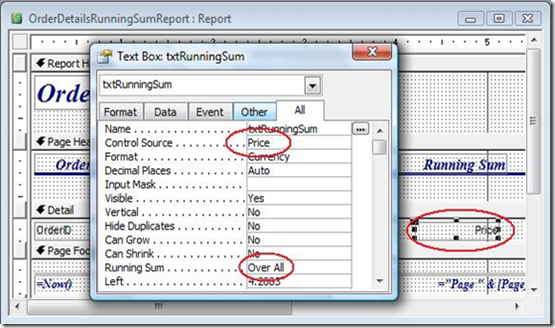
A numbered query is a query where each record is numbered sequentially. There may be a variety of reasons to do this. You might have a test question database where you want each question to be automatically numbered. Or you might want to export a customer list with sequential numbering to an external source like Excel. While this is simple to do in an Access report, it requires some advanced techniques to do in a query.In an Access report, all you need to do is add an unbound text box in the Detail section, put =1 in the control source, and set the Running Sum property to Over All. See Figure 1.

Figure 1: Shows the property dialog box for a text box on a report that will create a numbered sequence.
But suppose you don't want to do it in a report. Suppose you want to do it directly in a query. There are two different ways to accomplish this. The first uses the Domain Aggregate Function DCount and the second uses a Correlated Subquery.
Both of these methods require a unique column in the table to create the sequence on. This could be the Primary Key field or any field that has a Unique Index. In the following example, the Customers table has two such columns, CustID (Customer ID), which is the primary key, and CustName (Customer Name), which has a unique index.
I’ve already discussed the Domain Function method in a previous article here: Domain Function Example: Numbered Query With DCount, so in this article, I’ll address the Sub Query method.
Correlated Sub Query Method
Subqueries can be used in multiple places in an SQL statement. Most of the time they’re used in the FROM clause or the WHERE clause. But they can also be used in the Field List, which is where I’ll use it here.
When used in either the FROM clause or Field List, the query must be correlated to the main query. What does that mean? Well, as the name implies, correlated means co-related, that is the records in the subquery must be related to a single record in the main query. In this way, the subquery can be executed for each record in the main query.
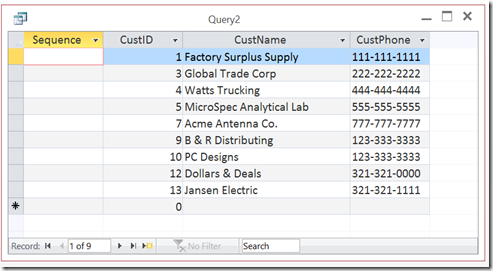
Let me take this in small steps. Suppose I have a Customer table that looks like this:

The Main Query
The table is sorted on CustID, but that field is not sequential since there are gaps in the numbering. I can see from the Record Navigator at the bottom of the query that CustID of 7 is actually the 5th record.So first, I’ll create a placeholder in my query:
SELECT Null AS Sequence,
Customers.CustID,
Customers.CustName,
Customers.CustPhone
FROM Customers
ORDER BY Customers.CustID;
It is very important that the main query should be sorted on the field the sequence will be created on. In this case CustID.
The Sub Query
Now I just need a way to replace the Null with the sequential value. I can find the value of any individual record (say CustID=7) with a query like this:
or in SQL
SELECT Count(1) AS Rec
FROM Customers
WHERE Customers.CustID<=7
The result of which will be:

Adding that to my main query, I could try something like this:
SELECT (Select Count(1) FROM Customers WHERE Customers.CustID <=7) AS Sequence,
Customers.CustName,
Customers.CustPhone,
Customers.CustID
FROM Customers
ORDER BY Customers.CustID;
but this will create a couple of problems.
The first is a syntax issue. I can’t directly reference the same table in two separate FROM clauses in a single SQL statement. I need to Alias the table name in the subquery
Select Count(1) FROM Customers as A WHERE A.CustID <=7
so I’d get:
SELECT (Select Count(1) FROM Customers as A WHERE A.CustID <=7) AS Sequence,
Customers.CustName,
Customers.CustPhone,
Customers.CustID
FROM Customers
ORDER BY Customers.CustID;
The second problem is that this will return a 5 for every record.

Pulling Them Together
The last piece is to reference the CustID in the main query rather than the hard-coded 7.
SELECT (Select Count(1) FROM Customers as A WHERE A.CustID <=Customers.CustID) AS Sequence,
Customers.CustName,
Customers.CustPhone,
Customers.CustID
FROM Customers
ORDER BY Customers.CustID;
Which gives me this:

Here's how it works.
So in the first record, the CustID is 1. So the subquery opens the Customers table again and sees that there is only 1 record whose CustID is less than or equal to 1. So it returns 1.
Then it processes the second record. The CustID of that record is 3, and the subquery sees that there are only 2 records which have an CustID whose value is less than or equal to 3. So it returns 2.
And so on.
Other Fields
You don't need to use a number field as your Order By field. You can sort on text fields and number the query as well.
If you wanted to sort on the Customer Name field (CustName), you would change the subquery to the following:
WHERE A.CustName <=Customers.CustName) AS Sequence,
Customers.CustName,
Customers.CustPhone,
Customers.CustID
FROM Customers
ORDER BY Customers.CustName;
The output would look like this:

Domain Aggregate Function Method
As I said, this can also be done with a DCount Function, which I discussed in a previous article: Domain Function Example: Numbered Query With DCount
However, you can find both methods on my website in this sample: NumberedQuery.
.










 The View button displays the results of the query, that is, which records will be updated. The Run button actually appends the records to the target recordsource.


