Showing posts with label Normalization. Show all posts

Wednesday, October 18, 2017

Really Bad Design Decisions: A Case Study

Sometimes a single design decision can have a cascade effect, which causes multiple, secondary design errors. One such error, commonly made by novice developers, is to slavishly follow a pre-existing paper form to determine their table design.

Now certainly, when creating a database to replace a paper-based system, it is vitally important to assemble all of the forms and reports used in the system. It is by a careful review of these documents that the developer determines a majority of the fields he or she will need in order to store and report the information in the system. After all, if an input form has a place for Order Date, then the database needs a field to store it. Likewise, if a report displays the Order Quantity, then this information has to be stored in the database somewhere.

But paper forms are not created with proper database design in mind. They are designed to make it easy for humans to fill out. This design can be at odds with established design principles. By blindly following the paper form to determine the database design, the developer can create a system subject to numerous data and relational integrity errors.

Case Study: OB Log

Several years ago, I ran into a database that was the poster child for this error. I was asked to create a database to automate a logbook for the Obstetrics department of a local hospital. Someone in the department, who had some experience with Access, had taken a first pass at creating a database.

Figure 1 shows the main data entry for the application.

Figure1
Figure 1: Main entry form for the OB Log database
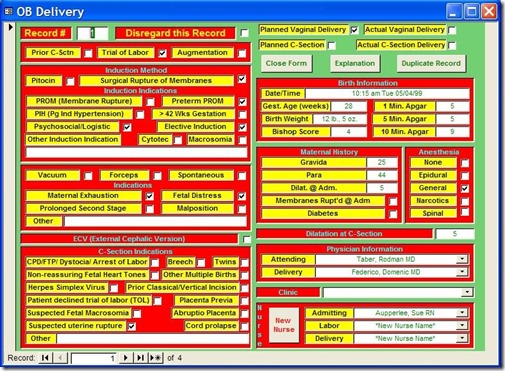
For the purposes of this article, we're going to ignore the numerous application design errors and concentrate on the database design errors because they're much more important and difficult to fix. Nevertheless, I'd be remiss if I didn't at least mention them. They are:

  1. Hideous use of color. With color, less is more.
  2. The controls are scattered about, making the user hunt for them.
  3. The controls are not exactly aligned, giving the form an amateur look.
  4. The labels for the controls are sunken. This confuses the user as to which as to which controls data can be entered in. In general, labels should be flat, text boxes should be sunken, and buttons should be raised. Any variation just confuses users.

But these application design issues pale in comparison to the database design problems.

Base Assumption: Paper Form Design Determines Database Design

All of the problems below stem from a single assumption: the design of the paper form is also the best design for the database. As we will see, this is not the case. Let's look at the problems resulting from this decision.

Problem 1: Single table design

Because all of the information here was on a single paper form, the developer incorrectly assumed it should all go in one table. The first thing I did when I looked at the database was to open the Relationship Window. It was blank. I knew at that point the design was in trouble. There were supplementary tables, a bewildering number, in fact, but they were just look-up tables that had no relationship to the main data table.

For instance, there was a look-up table called "Dilatation," which held the numbers 1 though 10, the acceptable values for the Dilatation field. There was a table called "Hours" which held the number 1 through 12, a table called "ZeroToThree," which held the numbers 0 through 3. There were also look-up tables for the doctors and nurses.

While many of these tables were in fact useful, there were no tables to hold information representing relationships in the data. In other words, the information that was the meat of the application was in a single table. It is rare when all the information of a complex process can be stored in a single table.

Problem 2: Multiple Yes/No fields

The reason complex processes can rarely be stored in a single table is because most of the time, the data contains One-To-Many relationships. For instance, each Delivery can have one or more Induction Indications, i.e. reasons why labor should be induced. On the paper form, these indications were represented like this:

Figure2
Figure 2: Paper form layout for Induction Indicators
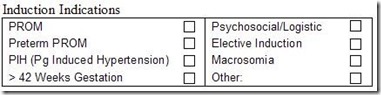
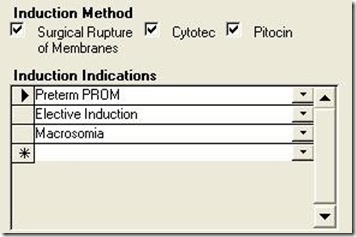
Each delivery event can have multiple reasons for inducing labor. But since you can't put multiple values in a single field, the developer chose to create 8 Yes/No fields, each representing one indication. On the form, they looked like this:

Figure3
Figure 3: Portion of the application form implementing Induction Indications.
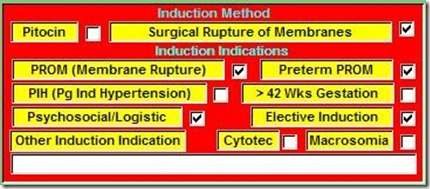
At first blush, this is a reasonable solution. You can easily query the table for one or more of these indications by testing for a Yes value in any of these fields. For instance:

SELECT * FROM OBDelivery WHERE PROM = TRUE OR PIH = TRUE

However, other, more complex queries are difficult or impossible with this design. For instance, what if I wanted a count of the following Indications: Elective Induction, Macrosomia, and Preterm PROM with a result like this:

Figure4
Figure 4: Complex query counting the number of Induction Indicators.
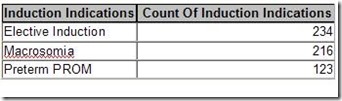
With the single-table design, I would have to create a complex Union query like this:

SELECT "Elective Induction" AS Induction Indications, Count([Elective Induction]) AS [Count Of InductionIndication]

FROM [OB DeliveryOld]

WHERE [Elective Induction]=True

GROUP BY "Elective Induction"

UNION

SELECT "Macrosomia" AS Induction Indications, Count([Macrosomia]) AS [Count Of Induction Indication]

FROM [OB DeliveryOld]

WHERE [Elective Induction]=True

GROUP BY "Macrosomia"

UNION

SELECT "Preterm PROM" AS Induction Indications, Count([Preterm PROM]) AS [Count Of Induction Indication]

FROM [OB DeliveryOld]

WHERE [Preterm PROM]=True

GROUP BY "Preterm PROM";

If I wanted a count of all the Indications, I would have 8 separate Select statements Unioned together, one for each Indication.

However, in a properly designed database, the query to do this would be as simple as:

SELECT InductionIndications, Count(II_ID) AS Count Of Induction Indications

FROM RefInductionIndications INNER JOIN tblInductionIndications ON

RefInductionIndications.II_ID = tblInductionIndications.II_ID

WHERE InductionIndications In ("ElectiveInduction","Macrosomia","Preterm PROM")

GROUP BY InductionIndications;

So what is the proper design? The key to understanding this is to realize that you can group the individual Indication fields as values for a single field in your table. These values can be stored in a separate lookup table called refInductionIndications. If a delivery could only have one of these indications, there would be a simple One-To-Many between the Delivery table (OBDelivery) and the reference table.

However, since each delivery can have one or more induction indication, there is actually a Many-To-Many relationship. Each Delivery can have one or more InductionIndications, and each InductionIndication can be part of one or more Deliveries.

To create this relationship, you create an intersection table (sometimes called a linking table). The only two fields in this table are the primary key fields of each of the other tables. These fields become foreign keys in relationships created with the other two tables. To make sure you don’t get duplicate records in the intersection table, you make the foreign key fields a compound primary key.

In the Relationship Window, the relationship looks like figure 5:

Figure5Figure 5: Correct design for storing multiple Induction Indications per Delivery.

Implementing this in the application can be accomplished with a simple subform whose record source is a query based on a join tblnductionIndications and refInductionIndications. In this way, the user can select as many Induction Indications as required. The subform would look something like figure 6:

Figure6
Figure 6: Subform for Induction Indications for properly designed application
.

Another problem of having multiple Yes/No fields to represent grouped data falls under the heading of maintenance. What happens if a new Induction Indication must be added to the database?

With the single-table design, the table design itself would have to be modified, of course, but so would the form (a new check box would have to be added to an already cluttered form), and EVERY query and report using Induction Indications would have to be changed. This would require heavy, developer support.

On the other hand, with the proper database design (Figure 5), adding a new indication is as easy as adding a new value to the lookup table. The users can easily do it themselves through a maintenance form in the application, and it would require no modification of the application at all.

This problem was also repeated in the Vacuum/Forceps Indications and C-Section Indications sections. For each of these, the developer created multiple Yes/No fields when, in fact, a separate table was required.

Problem 3: Complex programming to Overcome Design Flaws

When a developer does not pay enough attention to the initial design, it often requires complex programming to overcome the flaws.

Problem 3a: Multiple Births

The design of the paper form also misled the original developer regarding birth information. He never asked the obvious question, what happens if there are multiple births for a single delivery, i.e. twins or triplets?

The original paper form had only one place for Birth information. When there were multiple births, hospital staff would simply use a second form, only fill out the birth portion, and staple it to the first form. This in itself should have told the developer that there was a One-To-Many relationship between the mother's information and birth information.

Because the developer was stuck with the single-table design, he was forced to create program code to: 1) duplicate all of the Delivery information into a new record, 2) delete the Birth information from the new record, and 3) allow the user to enter the new Birth information for each of the multiple births.

This design resulted in a huge amount of redundant data and opened the door for data integrity errors. If any of the Delivery information changed for a multiple-birth delivery, the users would have to edit multiple records, with the likelihood of data entry errors.

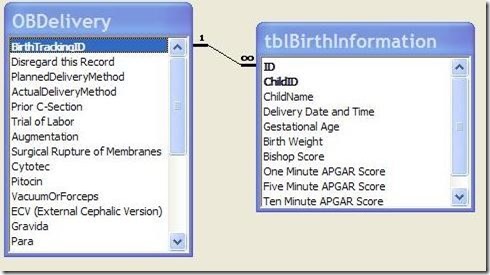
Of course, the correct design is to have a separate Birth table that is related to the Delivery table on the Primary Key field of the Delivery table (BirthTrackingID).

Figure7
Figure 7: Correct design for modeling multiple Births per Delivery
.

The form could be modified to have a subform for holding the Births. In this way, the Delivery information would be held only once, yet the results for each individual birth could be accurately recorded while maintaining a link to the Delivery table.

Problem 3b: Date format

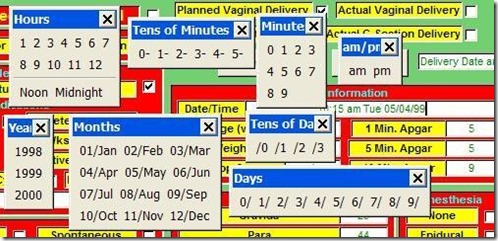
On the paper form, the Birth Date/Time was displayed in a particular format: i.e. "10:15 am Tues. 05/04/99". The developer believed he needed to input the date in that format. Therefore, he created the Date/Time field as a text field and created a complex process involving numerous Toolbars, Macros, and program code to assist the user in entering the data.

Clicking the Date/Time field produced Figure 8.


Figure8
Figure 8: Series of Toolbars pop-ups when the Date/Time field was entered, which was supposed to assist the user to enter a date into a text field. A simple input mask for a date/time field would have been better.
Problem 4: Copying Paper Form Design for Application Form

This last problem is not so much a database design problem, but an application design problem. While it is I important to follow the flow of the paper form to make data entry as easy and error-free as possible, the developer should not feel constrained to slavishly imitate the layout of the paper form to produce the application form.

As the developer, you should work with the client to develop the data entry form to make it as easy as possible for the users. This may also mean a redesign of the paper form to facilitate entry into the database.

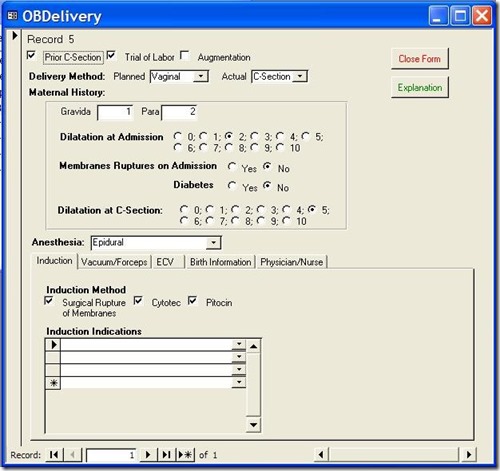
In my case, I redesigned the database form to look like this:

figure9
Figure 9: Redesigned Data Entry Form

With each group of related data in its own tab on the bottom. This led to a much cleaner design, which was easier for the data entry people to use. We also redesigned the paper form to facilitate this application form.

On-line Database Sample:

On my website, (http://www.rogersaccesslibrary.com), there is a sample database called "ReallyBadDatabase.mdb", which illustrates the problems discussed here, and another called "ReallyBadDatabaseReborn.mdb", which shows how I corrected them.

Conclusion:

Does this mean the developer should completely ignore the layout of the paper forms? No. Assembling all of the input forms and reports is a vital part of the database development process. They will provide the majority of the fields necessary to the project. But you cannot let them determine your database design. As the developer, that's your job.

In general, when dealing with a paper input form do the following:

  1. Look for logical groupings within the fields on the form. For instance, PROM, Preterm PROM, PIH, and Macrosomia are all Induction Indications.
  2. Look for relationships in your groupings. For instance, each Delivery can have one or more Induction Indications. When one entity (Delivery) in your database can have multiple of another entity (Induction Indications), this tells you there needs to be a separate table for this entity.
  3. When there are a series of check boxes on a form, and they all represent alternatives of the same thing, you should not create multiple Yes/No fields, but instead create a single field where the acceptable values include all the labels of the check boxes. If more than one of these values can be selected, then you need an intersection or linking table to implement the Many-To-Many relationship.
  4. Regardless of the formatting on the form, all dates should be entered as Date/Time fields in the database. You can format the output with the Format function to meet the users needs.
  5. Check with the users of the system to make sure you have accurately modeled the data and relationships of the system. Also work with them to create an application form that is easy to use. You may also have to work with them to redesign the paper form.

The developer has to delicately balance the needs of the users against proper database design techniques. In this way, the developer creates a system that is not only easy for the user, but also ensures accurate data.

Friday, September 29, 2017

Normalizing City, State, and Zip


Recently, I ran into a question on the internet about normalization that I thought would be good to repeat.

THE QUESTION:

 I'm toying with the idea of starting a new project, so I'm in brainstorming mode for table design. I'll be recording customer information in this application. Typical stuff: First and Last Names, Company, Street, Apt, City State and Zip, Phone numbers(s) and extensions, E-mail.

How do you guys recommend setting up the tables for City State and Zip? I was thinking that I would have:

TBL_General_State
PKStateID
StateAbbr (Limited to 2 letters)
StateName


TBL_General_City
PKCityID
FKStateID (Lookup to TBL__State)
CityName


TBL_General_Zip
PKZipID
FKCityID (Lookup to TBL__City
ZipCode


My customer information then would record only the zip code (PKZipID). And I could then use queries for the state, city, and zip information for forms, reports, etc.

Or is this beyond overkill?

ANSWER:

 By strict normalization theory, having City, State, and Zip in the same table violates the 3rd Normal Form because there are functional dependencies between those fields. However, functional dependencies are not all the same. There are strong dependencies and weak dependencies.

A strong dependency is one in which the value of a dependent field MUST be changed if another field is changed. For instance, suppose I have Quantity, Price, and ExtendedPrice, where ExtendedPrice is a calculation of the other two. If I change either Quantity or Price, the ExtendedPrice MUST be changed.

A weak dependency is one in which the value of a dependent field MAY be changed if another field is changed. City, State, and Zip are examples of weak dependencies. If I change a person's city, I may not have to change their state. They may have moved within the same state. Likewise, if I change the state, I may not have to change the city. There is, after all, a Grand Rapids, Michigan and Grand Rapids, Minnesota. The relationship between city and zip is even more complicated.

Now, it is possible to represent these fields in a fully normalized fashion, but I contend that it is more trouble for very little gain. There are two main reasons for normalizing data: minimize redundant data and maximize data integrity. Both of these can be achieved by using lookup tables for City and State without trying to represent the relationship between the two. A zip code could be mis-typed, of course, but it could also be mis-selected from a list, so to my mind there's no real reason to have a lookup table.

If you did normalize these fields, you could have a selection process that would present all possible combinations of values if you selected the City. For instance, if you had a combo box for City, you could have cascading combo boxes to select only the appropriate States and Zip codes. But it would be just as easy to mis-select the right value from this list as it would be to mis-select from independent lookup tables. And, of course, you'd have to create and maintain these relationships.

Therefore, normalizing City, State, and Zip adds a complication to your data model for very little gain, and in my opinion, is a good example of when to denormalize.

.

Wednesday, September 20, 2017

The Normal Forms: In a Nutshell


In this series, I have tried to explain in non-mathematical terms what the first three Normal Forms mean and how they determine database design.

This is not the most useful method of learning normalization. In fact, many expert developers never learn the formal definition of the normal forms. If you haven't already, I suggest you read the following series:

Normalization
ER Diagramming

However, I think it is useful to know what the Normal Forms are. Sometimes when you get stuck in a design, you can go back to the definitions to get yourself out of trouble.

So, in summary:

First Normal Form (1NF) says that each record must be unique, that is, it has a primary key. There are some additional restrictions on how such uniqueness is maintained such as not allowing positional referencing and no repeated columns.

Second Normal Form (2NF) says that each field in the record must depend on the whole primary key, not just a part of it.

Third Normal Form (3NF) says that no field must depend on any other field except the primary key.

William Kent, author of A Simple Guide to Five Normal Forms in Relational Database Theory, once abbreviated the first three normal forms like this:

"The Key, the whole Key, and nothing but the Key, so help me Codd."
.

Wednesday, September 13, 2017

The Normal Forms: Third Normal Form

Last time, in The Normal Forms: Second Normal Form, I discussed how to remove redundant data by identifying fields which are not functionally dependant on the entire primary key. Figure 1 shows the results.

Figure 1: Order table Decomposed into Orders and Order Details


This corrected some data anomaly errors in my data, however, data anomalies are still possible under 2NF. To prevent these anomalies, I need an additional rule: Third Normal Form (3NF).

Definition

A table is said to be in Third Normal Form (3NF) if:

  1. It is in Second Normal Form and
  2. If all non-key fields are mutually independent, that is, all fields are functionally dependant ONLY on the primary key field(s).

Implications

There are two main sources of data anomalies that 3NF corrects are 1) Redundant Data and 2) Calculated fields.

Redundant Data

Although I removed some of the redundant data when I split the Order table into Orders and OrderDetails, there is still some redundancy left, namely ProductNum and Item. Both of these fields are dependant on the entire primary key, so they comply with 2NF. However The ProductNum and Item fields are mutually dependant, that is, they depend upon each other. The product number determines the item description and the item description determines the product number.

Just as we saw in 2NF, redundancy can lead to inconsistent data being entered into the database or correct information being changed after the fact. Figure 2 shows some data anomalies possible under 2NF as a result of redundant data.
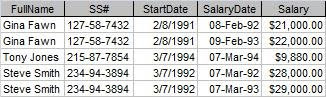
Figure 2: 2NF Data Anomalies Due to Redundant Data


Product A7S has two different items associated with it: either a wrench or a nail. Which is it?

Also, two product numbers (B7G and B7H) are associated with an Item called "saw". Is this the same saw or not?

Calculated Values

Mutual dependency is also an issue with storing calculated values. Suppose I had a Quantity and Price field and I decided to calculate the ExtendedPrice by multiplying the them. This is a common database error made by novices.

The problem is one of dependency. The Extended Price calculation depends on the Quantity and Price fields for its value. 3NF says that no field should depend on any field except those making up the primary key.

If I store that calculation and later go back and change one of the dependant fields (either the Quantity or the Price), my calculation will be incorrect. Figure 3 shows some calculated values anomalies.

Figure 3: Anomalies with Calculated Values


First of all, if the user is manually calculating and typing in the value of the Extended Price, the value could be anything, even a calculation from a different row. So let's assume I have an automated process, a formula in a form which calculates the value.

The problem is that you must depend on programming to maintain your data integrity, not the database itself. If the integrity is maintained at the database level, it cannot be subverted.

In the case of the table above, the first anomalous record was caused by changing the Quantity from 1 to 2 after the fact. But because I didn't have a process to re-calculate the value if Quantity changed, the Extended Price is now wrong.

In the second case, an Update Query was used to raise the price of nails was raised from $0.09 to $0.10. Unfortunately, the query did not include a new calculation, so all Extended Price calculations for nails are now wrong.

Implementation

The problem of calculated values is a simple one to solve. Don't. As a general rule, I just don't store calculations. There are minor exceptions, but in most cases, I'll be safe by just leaving them out. When I need these values, I'll calculate them as output in either a query, form, or report.

As with 2NF, the solution to redundant data is to remove it to a separate table, leaving one field to join back to the original. In this case, the ProductNum, Item, and Price fields will go into the Products table. I'll leave ProductNum in the Order Detail table to maintain the relationship. Figure 4 is the result.

Figure 4: Decomposing Order Details to Remove Redundant Data


So now I've removed as much redundant data as possible. There's still a little left. There always will be in order to maintain the relationships between tables. But none of the redundancy will result in data anomalies, so I can say with confidence that my tables are now normalized to Third Normal Form. Figure 5 shows the final design.

Figure 5: Final Design


In my next and final post: The Normal Forms: In A Nutshell, I'll wrap it all up.

.

Monday, August 28, 2017

The Normal Forms: Second Normal Form

Last time, in The Normal Forms: First Normal Form, I discussed the rules for the basic arrangement of data in a table. If you don't follow those rules, called the First Normal Form (1NF), you don't even have a table. But even if a table is normalized to 1NF, that doesn't mean it's perfect. Figure 1 shows a table normalized to 1NF.

Figure 1: Order Table - 1NF


The problem here is the danger of introducing errors, called data anomalies, into the table. Data anomalies can be introduced by operator error or through programming. Once you have a single data anomaly in your table, all of your data is suspect, so the remaining normal forms work to remove such data anomalies. Figure 2 shows the same table with data anomalies present.

Figure 2: Order Table with Data Anomalies Present


As you can see, Order 112 has two different customer numbers (444 and 445), which is correct? It is impossible to tell. In addition, both product numbers B7G and B7H are identified as a 'saw'. Are these the same product with different product numbers or different products with the same description? Again, I can't know based on the data in the database.

The root cause of these data anomalies is redundant data, that is, data that is repeated in multiple rows. So we need to minimize this redundant data as much as possible.

Now wait a second! Didn't I just say in the last post that I HAD to repeat the values? Yes I did. But that was to comply with 1NF, which is not the end of the story.

Definition

So let's look at the definition of Second Normal Form (2NF). A table is said to be in 2NF if:

  1. It is in 1NF.
  2. Every field is functionally dependant on the entire primary key, that is, it depends on the entire primary key for its value.

Functional Dependency

Before I can continue, I have to talk a bit about functional dependencies, because all of the remaining normal forms rely on this concept. Functional dependency speaks to the relationship that fields in a table have to each other. It is perhaps best explained by example.

Suppose there is an Employee table, and I am an entity in that table. There is a row that represents all the information about Roger Carlson with Social Security Number (SSN) acting as the primary key. Since all the fields in my row are information about me, and I am represented by the SSN, we can say that each field depends on SSN for its value. Another way to say it is that SSN implies the value of each of the other fields in my record.

If a different row is selected, with a different SSN, the values of all the other fields will change to represent that entity.

Implications

Second Normal Form says that all of the fields in a table must depend on the ENTIRE primary key. When there is a single primary key (like SSN), it is pretty simple. Each field must be a fact about the record. But when there is a compound primary key, it's possible that some fields may depend on just part of the primary key.

Going back to our Order Table example, Figure 3 shows these partial dependencies.

Figure 3: 1NF Orders Table showing dependencies


In order to uniquely identify the record, the primary key of this table is a combination of OrderNum and ProductNum (or Item, but a number is a better choice).

2NF says that each field must depend on the ENTIRE primary key. This is true for some fields: Quantity depends on both the OrderNum and ProductNum, so does Item. However, some fields do not.

Order 112 will be for customer 444 regardless of the product selected. The order date does not change when the product number changes either. These fields depend ONLY on the OrderNum field.

Since some fields do not depend on the entire primary key, it is not in Second Normal Form. So what do I do about it?

Implementation

The solution is to remove those records, which do not depend on the entire primary key, to a separate table where they do. In the process, I remove the redundant or repeated data so there is just a single record for each. Figure 4 shows the process of decomposing the table into two tables.


Figure 4: 1NF Orders table Decomposed to 2NF


This corrects the data anomaly with the two different customers for the same order. However, I still have the problem of the product number and the item description. It's still possible for the same product to have different descriptions or different items sharing the same ProductNum, as Figure 5 illustrates.

Figure 5: Remaining data anomalies.


Product A7S is either a wrench or a nail, and a saw is either product number B7G or B7H.

To correct these problems, I need to add yet another normal form: Third Normal Form. I'll talk about that next.

.

Wednesday, August 16, 2017

The Normal Forms: First Normal Form (1NF)

In Normal Forms: Introduction, I introduced the topic of the Normal Forms, the theory behind the arrangement of fields into tables. Since it is usually best to start at the beginning, I'll begin with the First Normal Form.

The First Normal Form, or 1NF, is the very lowest, basic arrangement of fields in a table. If your table is not in 1NF, then it isn't really a table. Sadly, many novice databases are not even in 1NF.

Definition
A table is said to be in First Normal Form if:
1) there is no row or column order
2) each row (record) is unique
3) each row by column value (field) contains exactly one value
4) there are no repeating columns

What does this mean?

First of all, the operation of the table will be unaffected by the order the rows are in or the order the fields are within the row. It means that each record must be complete unto itself without referencing another row positionally, for example, the row above. Likewise the position of the fields is irrelevant.

Since each record is unique, it means there are no duplicate records. This uniqueness is defined by a field or combination of fields whose value will never be duplicated. This is called the primary key. In order to assure uniqueness, no part of a primary key may be NULL.

Because a field must have a single value, it cannot contain a list or compound value. One over looked consequence of this rule is that each field MUST have at least one value. If the value of the field is not known, it is said to be NULL. (There is some debate over whether NULL is actually a value. I maintain it is, but the discussion is largely semantic.)

Lastly, there are no repeating columns. Repeating columns are columns that store essentially the same information. They may be columns like Product1, Product2, Product3; or multiple Yes/No columns that represent the same information like each product having its own column (Saw, Hammer, Nails).

Implications

Let's take a look at how these rules are implemented and what they mean for table design.

Suppose I want a simple Order table with OrderNum, CustomerNum, OrderDate, Quantity, Item, and ProductNum. Although the definition of 1NF is fairly simple, it precludes a wide range of data arrangements. Let's take a look at some of these arrangements.

Figure 1 shows one way such data can be arranged.

Figure 1: Records with Missing Values


To make each record unique, the primary key would have to be OrderNum and Item. However, since no part of the primary key may be Null, this arrangement won't work. All the values of the primary key must be filled in.

But even more than this, the record is not "complete" unto itself. That is, it refers to other records for information. It's not that the values of OrderNum, CustomerNum, or OrderDate are unknown and therefore NULL. I do know the value, but I'm attempting to represent that data positionally. This, of course, violates the first rule (order is irrelevant) and rule 3 (each field must have a value).

This arrangement is common in spreadsheets and reports, but it is not sufficient for storing data.
Figure 2 shows another way the data can be arranged.


Figure 2: Information Stored In Lists


This violates rule 3. Each field must hold one and only one piece of information and not a list. It would be a nightmare to do anything with the date in the Item field other than simply display it because the database management system is designed to treat fields as indivisible.

While Figure 2 is an extreme example that mixes multiple fields in addition to multiple field values, believe it or not, I have also seen database designed like Figure 3:

Figure 3: Data stored in multiple lists


While this is better than Figure 2 (at least it does not mix fields), it is still not atomic and you'd have difficultly associating a quantity with a particular product.

Compound Values:
1NF also precludes compound values, things like full names in a single field or multi-part identification numbers.

Full Names

Why not store a full name? Roger J. Carlson is certainly pertinent information about me. However, it is not indivisible. It is made up of a first name, middle initial, and last name. Because I may want to access just pieces of it (using the first name in the salutation of a letter or sorting by last name), the information should be stored in separate fields.

Multi-part Numbers

Often, a database requirement is to have an identification number that is composed of different, meaningful parts. A serial number may have a four-digit product code, followed by the manufacture date (8 digits), and ended with the facility ID. It might look like this COMP02222008BMH. While this may be a useful arrangement for humans, it is useless in a database. Each value should be stored in a separate field. When the serial number is needed, it can be concatenated easily enough in a query, form, or report.

Figure 4 shows data that is stored in repeated columns.

Figure 4: Data Stored in Repeated Columns


This arrangement is common for people who use spreadsheets a lot. In fact, this is so common it is called "committing spreadsheet". The problem, in addition to having multiple columns, is that in order to associate a quantity with a product, you would have to do it positionally, breaking rule 1.

Lastly, another version of the Repeated Columns error is multiple Yes/No columns. Figure 5 illustrates that.

Figure 5: Data Stored in Yes/No Columns


At first blush, this does not seem to have the same problem, but all I've done is replace generic field names (Product1, Product2, etc) with specific ones (wench, saw, etc). It would be extremely easy to check a second field in any row and they you would have no idea which was correct.

Implementation

As we've seen, First Normal Form precludes a lot of possible data arrangements. So what's left? There's really only one possibility left. Figure 6 shows it.

Figure 6: 1NF Correct with Repeated Rows


Each row has a unique identifier and there are no duplicates. Each field contains a single value. The position of the row and field is irrelevant, and lastly there are no repeating columns.

It's perfect. Right? Well, no. While this table does conform to 1NF, it is still has some problems; problems that 1NF is not equipped to handle. For those, I need to look at the Second Normal Form (2NF), which is what I'll do next time.

.

Tuesday, August 1, 2017

The Normal Forms: Introduction

Normalization is a methodology for minimizing redundancy in a database without losing information. It is the theory behind the arrangement of attributes into relations. The rules which govern these arrangements are called Normal Forms.

In What Is Normalization: Parts I, II, III, IV and V, I discussed the decomposition method of normalization, where you put all your fields into a single table and break the them down into smaller, normalized tables.

In Entity-Relationship Diagramming: Parts I, II, III, and IV, I discussed an alternate method which works from the bottom up. It takes the individual pieces of information (Attributes) and group them into logical groupings (Entities).

However, in neither case did I formally define or explain the Normal Forms. And that's for good reason. I find that only after people get a working understanding of normalization do they really understand the Normal Forms and what they imply. Therefore I usually leave them until last. If you haven't read the above mentioned serie, it would be worth your while to do so.

Normalization was first developed by E. F. Codd, the father of Relational Database theory. He created a series of "Normal Forms", which mathematically defined the rules for normalization. Each normal form is "stronger" than the previous, that is, they build upon the previous normal forms. Second Normal Form (2NF) encompasses all the rules of First Normal Form (1NF) plus adding its own rules. Third Normal Form encompasses all of 1NF and 2NF, and so on.

Figure 1: Each Normal Form Encompasses the Previous


In order, the normal forms are: First Normal Form (1NF), Second Normal Form (2NF), Third Normal Form (3NF), Boyce-Codd Normal Form (BCNF), Fourth Normal Form (BCNF), Fifth Normal Form (5NF), and Domain Key Normal Form (DKNF). BCNF comes between 3NF and 4NF because it was developed later, but because of its "strength" belonged between 3NF and 4NF.

Since each normal form encompasses all previous forms, in theory, the higher the normal form, the "better" the database.

In practice, however, normalizing to the first three normals form will avoid the vast majority of database design problems. So it is generally agreed that to be properly normalized, most databases must be in 3NF.

Beyond 3NF, the normal forms become increasingly specialized. Boyce-Codd Normal form and Fourth Normal Form were created to handle special situations. Fifth Normal Form and Domain-Key Normal Form are largely of theoretical intererst and little used in practical design.

So what I'm going to do for this series is limit myself to the first three normal forms, giving their definitions, implications for data, and how to implement them.

In my next post, I'll start with the First Normal Form.

Tuesday, May 16, 2017

What Is Normalization: Part V

Many-to-Many Relationships

In What Is Normalization, Part IV, I discussed the three basic kinds of relationships: One-to-One, One-to-Many, and Many-to-Many. In this post, I'll concentrate on the many-to-many.

Many-to-Many (M:M)
In real life, M:M relationships are extremely common. Each customer can order many products, and each product can be ordered by many customers. In high school, each teacher has many students, and each student has many teachers. At a conference, each attendee attends many sessions, and each session has many attendees.

Returning to our Employee Database example, suppose we want to store a job description as well as the salary history. Since each employee can hold many positions over the course of his or her career, and each position can be held by many employees, we have a many-to-many relationship. So let's go back and change our original table and see how we can normalize it.

Figure 1: Expanded Employee Table (Non-Normalized)

You'll notice that I've changed the SS# field in favor of an EmployeeID field. SS# is a really bad field for a primary key. You still might want to store SS#, but not for a primary key, so I'm leaving it out of this example.

Like the example in What Is Normalization Part II, the table has redundant data, and so it needs to be normalized. And just like in Part II, I'll remove the redundant Employee information into its own table, like so:

Figure 2: Employee Table

Figure 3: Job History Table


But looking at the Job History Table, we can see that we still have redundant data. Job Description is repeated several times. Unfortunately, we don't have a convenient linking field as we did with the EmployeeID field in the Employee Table. So we'll have to make one up. When you make up a primary key, as opposed to using an already existing field for your primary key, it is called a surrogate key. I discuss the difference between surrogate keys and natural keys in What is a Primary Key?

So, in order to remove the job description information, I'll create a table called Job Description and fill it with just one instance of each value. Then I'll also add a field called JobID, and fill that will it with unique values, thus creating a surrogate primary key. Next, I'll return to the Job History table and replace the job descriptions with the corresponding JobIDs. Like this:

Figure 4: Revised Job History Table

Figure 5: Job Types Table


Okay, so what does this have to do with Many-to-Many relationships? Well, if you look at Employee and Job Types, you can see that there is actually a many-to-many relationship between these tables. Each Employee can have many Job Types over time and each Job Type can apply to many Employees.

Unlike one-to-one and one-to-many, many-to-many relationships cannot be directly represented in a relational database. In order to create one in a database, we have to have an intersection table (also called a "linking table"). In this case, the linking table already exists: Job History.

To represent this M:M, you create a relationship between each of the main tables (Employee and Job Types) to the linking table (Job History), with the "many-side" on the linking table. The final relationship will look like this:

Figure 6: Many-to-Many Relationship Implemented


Notice that each primary key of the main tables is represented as a foreign key in the linking table, and while each of the foreign keys is part of the primary key of the linking table, neither is the entire primary key.

So far, I've approached Normalization from a particular perspective. I've put all the information into a single table, looked for redundant data, and removed the redundancy into a separate table. This approach is called "decomposition". It works very well for simple data models, but becomes unwieldy in complex models.

However, there is another approach that has proven easier for me to work with very complex data models. This approach is called Entity-Relationship Diagramming. In Entity-Relationship Diagramming: Part I, I'll talk about that.

.

Monday, May 1, 2017

What is Normalization: Part IV

More Relationships

In What Is Normalization, Part III, I discussed how to create a relationship to join our normalized tables back together so that no information was lost in the normalization process.

There are three basic kinds of relationships: One-to-One, One-to-Many, and Many-to-Many.

One-to-One (1:1)
A marriage is an example of a 1:1 relationship. A husband can have one and only one wife and a wife can have one and only one husband. Of course, in the real world, there are exceptions to this, but let's accept this as a general case.

To implement a one-to-one relationship, you must have a primary key in both databases, which stores the same information, SS# for example. So continuing with our employee database example, suppose we had a ContactInfo table which stored Address, City, State, Zip, and Phone.

In this simplified example, we'll assume that people have a single address and phone. The primary key for this table would also be SS# since each record in the ContactInfo table represents the contact information for a single employee.

To create the one-to-one relationship, I would click and drag the primary key from Employee (SS#) to the primary key of ContactInfo (also SS#). Although the fields are named the same in this example, they do not have to be, however, they MUST represent the same information. In the Relationship Window, it would look like Figure 1.


Figure 1: One-to-One Relationship


Notice there is a 1 on each end of the relationship.

In relational databases, 1:1 relationships have limited utility. In most cases, the data elements from both tables can be combined into a single table.

One-to-Many (1:M)

This type of relationship is also known as the parent/child relationship for good reason. If we consider a biological parents only, we can say each mother can have one or more children and each child can have one and only one mother.

As I showed in Part III, the relationship between Employee and Salary History is a one-to-many relationship where each record in the employee table can be related to multiple records in the Salary History table, but each record in Salary History is related to only one record in Employee.

To implement this type of relationship, you must have a field in the "child" table that corresponds to the primary key in the "parent" table. Again, this field is SS# in our example, However, unlike the one-to-one relationship, it is NOT the primary key of Salary History, although it may be part of the primary key. Figure 2 shows this relationship.


Figure 2: One-to-Many Relationship


One-to-Many relationships are extremely common in relational databases.

Many-to-Many (M:M)

In real life, M:M relationships are extremely common. You'll notice that in both the other illustrations, I had to qualify the definition of both a marriage and parent/child. That's because real world definitions are messy. In some places in the world, a man can have multiple wives and a woman, multiple husbands. Sometimes simultaneously. Children can have more than one parent. In the real world, these relationships many-to-many.

Because many-to-many relationships are common in the real world, we must also know how to represent them in relational databases. Unfortunately, M:M relationships cannot be represented directly. They must be represented indirectly by a linking table and a pair of 1:M relationships.

In What Is Normalization: Part V, I'll show how.

.

Thursday, April 20, 2017

What Is Normalization: Part III

Putting It Back Together

In What Is Normalization, Part I, I defined normalization and the negative consequences of not normalizing your database. In Part II , I talked about how to normalize your tables to remove as much redundant data as possible. Now, it isn't much good to split your data into separate tables without the ability to put it all back together. For that, we need to talk about relationships.

Relationships store the information about how normalized data can be put back together. They are the heart and soul of a relational database like Microsoft Access. If you don't have relationships in your database, you don't really have a relational database.

Continuing our example from Part II, we have two tables: Employee and Salary History.

Figure 1: Employee

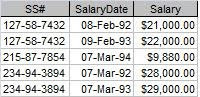
Figure 2: Salary History

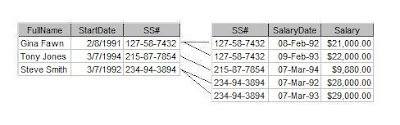
So how do we create a relationship between them? In a relational database, tables are related on common data elements -- specifically the primary key of one table and the foreign key in the other. I've defined primary key elsewhere, but foreign key is new. A foreign key is simply a field in another table that has the common data elements needed to create a relationship.
In our example, SS# is the primary key of Employee. In the Salary History table, SS# is the foreign key to the Employee table. If you've normalized your database properly, your related table should have a foreign key. Figure 3 shows how the data in our two tables will be related.
Figure 3: The tables related

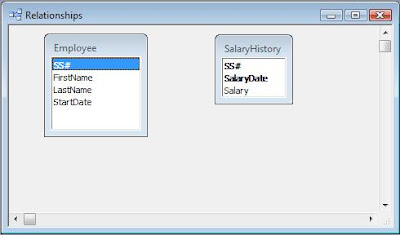
So how do we create this relationship? In Access, the easiest way is to use the Relationship Window. In Access 2003 and before, it can be found on the Database Toolbar or on the menu choosing Tools > Relationships. In Access 2007, go to the Database Tools tab on the Ribbon and choose Relationships.
To create your relationship, add both tables to the Relationship window. I usually RIGHT-click on the empty relationship window and choose Add Table. Your window should look like Figure 4.
Figure 4: Relationship window with tables added.

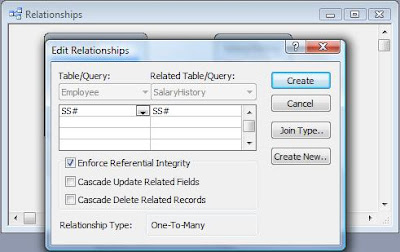
Next, Click on the primary key (SS#) in Employee and drag it over to the corresponding field in Salary History (also SS#). When you finish, the Edit Relationships dialog box will pop up. Figure 5 shows the dialog box.
Figure 5: Edit Relationships dialog box

It will already have the fields filled in. In order to actually make this a relationship, however, you MUST click the Enforce Referential Integrity check box. If this box is not checked, it it NOT a relationship.
If you cannot click the Enforce Referential Integrity box, then there is something wrong with your relationship. More than likely, it will say Indeterminate as a Relationship Type. Usually, this means you have attempted to create a relationship without one of the fields being a primary key. Don't simply uncheck the box and continue. Go back and fix the fields.
Click Create to finish the relationship.
Figure 6: Completed Relationship

You can tell that Referential Intergity has been enabled because the relationship line has a 1 on one end and an infinity symbol on the other. This indicates it is a One-to-Many relationship. That is, each record in the Employee table is related to one or more records in the Salary History table. The 1 will be next to the table where the link field is the primary key. If you do not have those symbols on your relationship, you do not have a relationship.
Here, I showed the One-to-Many relationship, which is the most common type in a relational database. But there are two others: One-to-One and Many-to-Many. I'll talk about those next in What is Normalization: Part IV.
.

Tuesday, March 28, 2017

What Is Normalization, Part II

Break it up. Break it up.

In What Is Normalization, Part I, I discussed various ways to represent data in a tabular form. All of those methods have problems -- from not storing enough data, to storing redundant data, to allowing data anomalies.

The Relational Database Model was created by Edgar F. Codd specifically to solve those problems. The foundation of the Relational Model is a process Codd dubbed "Normalization". It is the process of grouping related data elements into separate tables and then relating those tables on common data elements.

Since an example is worth a thousand cliches, let's look again at the example from Part I.

Figure 1: Salary History
Figure 1 shows the salary history of a small company. As is, it represents the lowest level of data organization a table must have in a database. Codd called this level the First Normal Form (1NF). (Don't worry, I'm not going to explain all the normal forms.)
Another rule of Normalization says that all of the fields in a table should be about just one "thing". But a look at Salary History reveals that some of the fields are not really about the salary history at all.

How do I know? Well, we can't talk about normalization without discussing primary keys. (See What is a Primary Key for a more detailed discussion.) The way that we can tell if all of the fields are about the same "thing" is by seeing if all the fields in the record depend on the entire primary key.

In Figure 1, we can see that the fields necessary to uniquely identify the record are SS# and SalaryDate (the date on which the salary increase was given.) But do FirstName and StartDate depend on the ENTIRE primary key? No, they do not. FirstName or StartDate do not change if the SalaryDate changes.

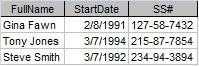
Therefore we need to move them to a different table. What table? Well, what are the fields about? In this case, they are about the employee, so we will create an employee table composed of FullName, SS#, and StartDate. SS# is the most obvious choice for a primary key in this example. (Note: Social Security number is NOT usually the best choice for a primary key in real life.)

Do FullName and StartDate depend on SS#? Yes they do. The SS# represents a single, real-life person and that person can have only one name and one start date.

Now we are left with three fields in Salary History: SS#, SalaryDate, and Salary. SS# and SalaryDate remain the primary key. Does Salary depend the entire primary key? Again, yes. Each person can have only one Salary increase on a particular date.

So normalizing the table structure requires two tables: Employee and Salary History, like so:

Figure 2: Employee


Figure 3: Salary History


Of course, now we have to somehow put the data back together. For that, we need Relationships. We'll look at that next time in What is Normalization, Part III.


.

Monday, March 20, 2017

What Is Normalization, Part II

Break it up. Break it up.

In What Is Normalization, Part I, I discussed various ways to represent data in a tabular form. All of those methods have problems -- from not storing enough data, to storing redundant data, to allowing data anomalies.

The Relational Database Model was created by Edgar F. Codd specifically to solve those problems. The foundation of the Relational Model is a process Codd dubbed "Normalization". It is the process of grouping related data elements into separate tables and then relating those tables on common data elements.

Since an example is worth a thousand cliches, let's look again at the example from Part I.

Figure 1: Salary History
Figure 1 shows the salary history of a small company. As is, it represents the lowest level of data organization a table must have in a database. Codd called this level the First Normal Form (1NF). (Don't worry, I'm not going to explain all the normal forms.)

Another rule of Normalization says that all of the fields in a table should be about just one "thing". But a look at Salary History reveals that some of the fields are not really about the salary history at all.

How do I know? Well, we can't talk about normalization without discussing primary keys. (See What is a Primary Key for a more detailed discussion.) The way that we can tell if all of the fields are about the same "thing" is by seeing if all the fields in the record depend on the entire primary key.

In Figure 1, we can see that the fields necessary to uniquely identify the record are SS# and SalaryDate (the date on which the salary increase was given.) But do FirstName and StartDate depend on the ENTIRE primary key? No, they do not. FirstName or StartDate do not change if the SalaryDate changes.

Therefore we need to move them to a different table. What table? Well, what are the fields about? In this case, they are about the employee, so we will create an employee table composed of FullName, SS#, and StartDate. SS# is the most obvious choice for a primary key in this example. (Note: Social Security number is NOT usually the best choice for a primary key in real life.)

Do FullName and StartDate depend on SS#? Yes they do. The SS# represents a single, real-life person and that person can have only one name and one start date.

Now we are left with three fields in Salary History: SS#, SalaryDate, and Salary. SS# and SalaryDate remain the primary key. Does Salary depend the entire primary key? Again, yes. Each person can have only one Salary increase on a particular date.

So normalizing the table structure requires two tables: Employee and Salary History, like so:

Figure 2: Employee


Figure 3: Salary History


Of course, now we have to somehow put the data back together. For that, we need Relationships. We'll look at that next time in What is Normalization, Part III.


.

Monday, March 13, 2017

What Is Normalization, Part I

Why Normalization?

What is normalization? Normalization is a methodology for removing redundant data from a database WITHOUT losing information.

There are many ways to represent data. Some of the most common are: spreadsheets, flat files, and relational databases. Each of these ways have their own advantages and disadvantages.

For instance, in a spreadsheet, it's acceptable to represent the data like this:

Figure 1

This is perfectly readable to a human. It is obvious that the row beneath Gina Fawn also belongs to her. Unfortunately, this is impossible for a database to interpret. The database must have all the information it needs on a single row. It cannot refer to another row to get the information it needs.

One way to correct this, would be to fill in the missing information.

Figure 2

Unfortunately, this requires storing a lot of redundant data. What's the big deal? It's only a couple of fields, right? But that's only in the example shown. What if we were storing all of the demographic data (name, address, phone, city, state, etc.) for a lot of people? This would waste a lot of storage capacity.


But wasted storage is not the worst problem. What if the SSN of Gina Fawn's first record was changed to 215-87-7854? Perhaps this was through operator error or maybe a programmatic update. It doesn't matter, the data has been changed. Now, which SSN is really Gina's? The database has no way of knowing. Worst still, the SSN matches Tony Jones. So, does that SSN represent Gina or Tony? Again, no way to know.

This same problem holds true for all the fields which hold redundant data. This is called a Data Anomaly error. Once you start having data anomalies, you cannot trust the integrity of your database.

One way to solve this problem is with Repeated Columns. This is a common solution in spreadsheets. With repeated columns, the non-redundant information (like row two in Figure 1) are stored as columns. We get something like this:

Figure 3

Now we don't have problems with redundancy, but we have additional problems. First of all, we have to decide how many repeated columns to create. In Figure 3, I only show one salary increase for Gina and Tony, but is that reasonable? What if Gina has five wage increases and Tony had seven? Is seven sets of columns enough? Do I cap it at the largest record? Or do I add more columns to accommodate growth? If so, how many?

Secondly, such a table structure requires a lot of manual modification and becomes untenable when you have a lot of data. Perhaps instead of just the date and salary, we are also storing the job description, pay grade, status, and so forth? The structure would be come so large and unruly that it would be impossible to maintain.

Fortunately, Normalization comes to the rescue. In What Is Normalization, Part II, I'll explain how. Thank Codd.

.