Friday, June 17, 2011

New Sample: Form_SynchronizedSubforms

By A.D. Tejpal

This sample db demonstrates synchronized scrolling of two subforms (both in datasheet view).

Two modes are covered:
    (a) One way synchronization: Top subform always functions as the master while the other one serves as the slave.
    (b) Two way synchronization: Whichever subform happens to be the active one, functions as the master while the other one serves as the slave.

Note: For ready identification, the subform currently serving as the slave, has a darker back color as compared to the master.

For each of the above modes, three alternative styles of scroll synchronization are demonstrated:
    (a) Synchronize horizontal scroll only.
    (b) Synchronize vertical scroll only.
    (c) Synchronize both horizontal and vertical scroll.

Sample data depicts student's scores in phase 1 (top subform) and phase 2 (bottom subform). For each student, wherever the scores in these two subform happen to differ, the same get highlighted as follows:
    (a) Top subform: Light grey.
    (b) Bottom subform: If value is greater than that in other subform, it gets highlighted in light green. On the other hand, if value is less than that in other subform, it gets highlighted in light pink.

Note: The above highlights get suitably updated promptly on editing of data in either of the two subforms.

Version:  Access 2000 File Format

You can find the sample here:
http://www.rogersaccesslibrary.com/forum/Form-synchronizedsubforms_topic566.html

Wednesday, June 15, 2011

New Sample: Query_ComputeAcrossFields_CodeLess

By A.D. Tejpal

    This sample db demonstrates computations across fields via pure SQL. In the first step, normalization of data is accomplished, using Cartesian join between the source table and an ancillary single field table holding the field names. Thereafter, a totals query provides the desired results.

    Two styles are covered:
    (a) Compute across all fields.
    (b) Compute across top 3 fields (i.e. fields holding top 3 values).

Version:  Access 2000 File Format

You can find the sample here:
http://www.rogersaccesslibrary.com/forum/query-computeacrossfields-codeless_topic565.html

New Sample: NormalizingRepeatingColumns3.mdb

By Roger Carlson

This sample demonstrates how to normalize a table that has repeated Yes/No columns.  It's purpose is to demonstrate the general principles of normalizing denormalized data from a spreadsheet.

Full article included

You can find the sample here: http://www.rogersaccesslibrary.com/forum/normalizingrepeatingcolumns3mdb_topic564.html

Tuesday, June 14, 2011

Normalizing Repeated Columns: Yes/No Fields (Part2)

Last time, in Normalizing Repeated Columns: Yes/No Fields (Part1) I talked about Normalizing data in repeated columns from a spreadsheet, like this:


Into a structure like this:


Using a One-Time process that creates the tables and relationships in addition to copying the data.  This time, I’ll talk about appending data to existing tables.
 

Appending to Existing Tables

The process for normalizing repeated column data into Existing Tables is similar to the One-Time process. It does, however, require you to create the tables and relationships correctly ahead of time. Because I've just created them in the previous section, I'll simply delete the data and re-append it from the linked spreadsheet.
The two processes are very similar, but I'll be using Append queries rather than Make-Table queries.
Step 1: Remove the common Patient elements.
Since I've already got a table, I'll use an Append query rather than the Make-Table query I used earlier:

INSERT INTO Patient ( Patient )
SELECT Patient
FROM Patient_RC
GROUP BY Patient;


Or in the Query Builder:


The resulting table looks like this:


Since I already have an autonumber primary key defined on the table, I don't need to do anything further.
Step 2: Create Symptom_Temp table
This step is exactly the same as Step 2 above. I'll use a Make-Table query to create a temporary table that will be used for creating the relationships later.

SELECT Patient, IIf([cough],"Cough") AS Symptom
FROM Patient_RC WHERE [Cough] = True
UNION ALL
SELECT Patient, IIf([Sneeze],"Sneeze") AS Symptom
FROM Patient_RC WHERE [Sneeze] = True
UNION ALL
SELECT Patient, IIf([Fever],"Fever") AS Symptom
FROM Patient_RC WHERE [Fever] = True
UNION ALL
SELECT Patient, IIf([Body_Aches],"Body aches") AS Symptom
FROM Patient_RC WHERE [Body_Aches] = True
UNION ALL SELECT Patient, IIf([Nausea],"Nausea") AS Symptom
FROM Patient_RC WHERE [Nausea] = True
ORDER BY Patient, Symptom;


As I showed in the previous post, there are two ways to make this into an Append query: 1) a Stacked Query, and 2) All In One.

Stacked Query

A stacked query is simply a query which uses another query in the FROM clause instead of a table. So if I save the above query as "qryTemp", I can use that query in the FROM clause of an Append query:

INSERT INTO Symptom_temp ( Patient, Symptom )
SELECT Patient, Symptom
FROM qryTemp;


Or in the Query Builder:


All-in-one Query

It's also possible to it in a single query. To do that, I surround the SQL of qryTemp in parentheses and use it in the From clause of the Append query. Like this:

INSERT INTO Symptom_temp ( Patient, Symptom )
SELECT qryTemp.Patient, qryTemp.Symptom
FROM
(SELECT Patient, IIf([cough],"Cough") AS Symptom
FROM Patient_RC WHERE [Cough] = True
UNION ALL
SELECT Patient, IIf([Sneeze],"Sneeze") AS Symptom
FROM Patient_RC WHERE [Sneeze] = True
UNION ALL
SELECT Patient, IIf([Fever],"Fever") AS Symptom
FROM Patient_RC WHERE [Fever] = True
UNION ALL
SELECT Patient, IIf([Body_Aches],"Body aches") AS Symptom
FROM Patient_RC WHERE [Body_Aches] = True
UNION ALL
SELECT Patient, IIf([Nausea],"Nausea") AS Symptom
FROM Patient_RC WHERE [Nausea] = True
ORDER BY Patient, Symptom) AS qryTemp;


The result will be a table that looks like this:


Step 3: Remove Duplicates from Symptom_Temp
To fulfill 3NF, I need to create a query that removes the duplicate Symptom values into the Symptom table. The GROUP BY clause works well for that. . As before, I'll use an Append write the data to my existing Software table:

INSERT INTO Symptoms ( Symptom )
SELECT Symptom
FROM Symptom_temp
GROUP BY Symptom;


Or in the Query Builder:


With the resulting table:


Again, this table already has an autonumber primary key, so I don't need to create one.
Step 4: Creating the Linking Table: Patient_Symptoms
So now, I've got my two "One-Side" tables: Patient and Symptoms. Now I just need to fill the linking table.

I can do that with an Append Query and a simple join of Patient, Symptoms and Symptom_Temp:

INSERT INTO Patient_Symptoms ( PatientID, SymptomID )
SELECT Patient.PatientID, Symptoms.SymptomID
FROM (Patient INNER JOIN Symptom_temp ON Patient.Patient = Symptom_temp.Patient)
INNER JOIN Symptoms ON Symptom_temp.Symptom = Symptoms.Symptom;


Or in the Query Builder:


The final result will look like this:


It is important to note that the order in which the data is moved is vital. Data must be written into the "one-side" tables (Patient and Symptoms) first, and then data can be moved into the "linking" tables (Patient_ Symptom).

This two-part post is available as a single download (with sample database) here:
http://www.rogersaccesslibrary.com/forum/topic564.html


Tuesday, June 7, 2011

Normalizing Repeated Columns: Yes/No Fields (Part1)

In my earlier series (The Problem of Repeated Columns), I defined repeated columns and talked about the data integrity problems associated with them. I also showed several different examples of repeated columns and the how difficult it is to query repeated columns as compared to the normalized equivalent. If you haven't read these yet, it would be worthwhile to read first. Similarly, if you are not familiar with the concept of Normalization, you should read my blog series What is Normalization?

One of the comments suggested I should discuss how to convert a table with repeated columns into a normalized table structure. I thought that was a really good idea, so I'm going to spend the next few posts doing so. The difficulty in discussing this issue, however, is that the exact solution differs with each table, so there is no single solution. Fortunately, in the last series, I showed 5 different tables, each with a slightly different structure, so while I cannot show a single solution that will work for every table with repeated columns, hopefully, one of the following will work for most cases.

Others in this series:
Patient Symptoms

In my post Querying Repeated Columns: Multiple IIFs, I discussed an example of a Patient table with repeated Yes/No columns that looked like this:

Figure 1: Patient table with repeated, Yes/No columns

Normalized to remove the repeated columns, the tables relationships would look like this:

Figure 2: Relationships for the Patient Symptom tables.

So how do I get the data from Figure 1 to Figure 2? Well, first of all, it depends on whether this is a one-time process where you are creating new normalized tables, or whether it is an on-going process where you are appending the data to existing, normalized tables.

In either case, however, not only do I have to split the records into separate tables, I also have to preserve the relationships between those records, so I have to do it is a specific order.


One-Time Process

Suppose I'm given a spreadsheet of data like this:


And I need to create a normalized database from it. I've already determined the tables I need (Figure 2 above), but if you're not certain what your table structure should be, you should read through my blog serie: What is Normalization, Entity-Relationship Diagramming, and The Normal Forms.

Link the spreadsheet into a database.

First of all, I need to get the spreadsheet into the database. I find it is preferable to link rather than import the file. Since I'm not going to be changing the data, there's no reason to import it. Once the file is linked it acts just like a table, and I can begin the process of normalizing it.

Step 1: Remove the common Patient elements.

Since I need to create a new table (called Patient) to hold these values, I'll use a Make-Table query:

SELECT Patient_RC.Patient INTO Patient
FROM Patient_RC
GROUP BY Patient_RC.Patient;


Or in the Query Builder:


The resulting table looks like this:


At this point, I need to add a Primary Key to the table. I prefer to use Surrogate Keys. (For a discussion of natural vs. surrogate keys, see my blog post: What is a Primary Key?)

Add surrogate key to PC table.

Adding a surrogate key to a table is as simple as opening it in Design View, adding an Autonumber Field, and making it the Primary Key.


Saving the table will automatically fill the autonumber field with values:


Step 2: Create Symptom_Temp table

As I showed in my post Querying Repeated Columns: Multiple IIFs it is necessary to combine multiple UNION queries with multiple IIF statements to create a list of Symptoms. Something like this:

SELECT Patient, IIf([cough],"Cough") AS Symptom
FROM Patient_RC WHERE [Cough] = True
UNION ALL
SELECT Patient, IIf([Sneeze],"Sneeze") AS Symptom
FROM Patient_RC WHERE [Sneeze] = True
UNION ALL
SELECT Patient, IIf([Fever],"Fever") AS Symptom
FROM Patient_RC WHERE [Fever] = True
UNION ALL
SELECT Patient, IIf([Body_Aches],"Body aches") AS Symptom
FROM Patient_RC WHERE [Body_Aches] = True
UNION ALL SELECT Patient, IIf([Nausea],"Nausea") AS Symptom
FROM Patient_RC WHERE [Nausea] = True
ORDER BY Patient, Symptom;


Note: You can't create or view this query in the Query Builder, however, you can create the first on (Cough) in the QB, then switch to the SQL View and copy and paste, modifying each for the specific column.

I still need to make this query into a Make-Table query. There are a couple of ways to do this. I can use a stacked query or all-in-one query.

Stacked Query

A stacked query is simply a query which uses another query in the FROM clause instead of a table. So if I save the above query as "qryTemp", I can use that query in the FROM clause of a Make-Table query:

SELECT Patient, Symptom INTO Symptom_temp
FROM qryTemp;

Or in the Query Builder:


All-in-one Query

It's also possible to it in a single query. To do that, I surround the SQL of qryTemp in parentheses and use it in the From clause of the Make-table. Like this:

SELECT Patient, Symptom INTO Symptom_temp
FROM (SELECT Patient, IIf([cough],"Cough") AS Symptom
FROM Patient_RC WHERE [Cough] = True
UNION ALL
SELECT Patient, IIf([Sneeze],"Sneeze") AS Symptom
FROM Patient_RC WHERE [Sneeze] = True
UNION ALL
SELECT Patient, IIf([Fever],"Fever") AS Symptom
FROM Patient_RC WHERE [Fever] = True
UNION ALL
SELECT Patient, IIf([Body_Aches],"Body aches") AS Symptom
FROM Patient_RC WHERE [Body_Aches] = True
UNION ALL
SELECT Patient, IIf([Nausea],"Nausea") AS Symptom
FROM Patient_RC WHERE [Nausea] = True
ORDER BY Patient, Symptom) AS Temp;


(Note: This cannot be done in the Query Builder)

The result (in either case) will be a table that looks like this:


Step 3: Remove Symptoms to Symptom Table

To fulfill 3NF, I need to create a query that removes the duplicate Symptom values into their own table, which I will call Symptom. The GROUP BY clause works well for that. As before, I'll use a Make-Table query to create a new table to hold the software values:

SELECT Symptom INTO Symptoms
FROM Symptom_temp
GROUP BY Symptom;


And as before, I'll add an Autonumber primary key, so the table looks like this:


Step 4: Creating the Linking Table: Patient_Symptoms

So now, I've got my two "One-Side" tables: Patient and Symptoms. Now I just need to create the linking table.

A "Linking table" is a mechanism by which Many-To-Many relationships are built in a relational database. (See: What is Normalizion Part V for more information.)

I can do that with a Make-Table Query and a join of Patient, Symptom_Temp, and Symptom:

SELECT CLng([Patient].[PatientID]) AS PatientID,
    CLng([Symptoms].[SymptomID]) AS SymptomID
INTO Patient_Symptoms
FROM (Patient INNER JOIN Symptom_temp
    ON Patient.Patient = Symptom_temp.Patient)
        INNER JOIN Symptoms
            ON Symptom_temp.Symptom = Symptoms.Symptom;


Or in the Query Builder:


Notice the expressions in the SQL Statement and the Query Builder: CLng([Patient].[PatientID]) and CLng([Symptoms].[SymptomID]). These are necessary because the Make Table query will attempt to create both PatientID and SymptomID as autonumber fields. Since a table cannot have two autonumber fields, this will give me an error.

Since they are both Foreign Keys, I don't want either to be autonumber. (A foreign key should NEVER be an autonumber.) So I use the CLng() function to convert them to the Long Integer datatype, which is the datatype which should ALWAYS be used to a foreign key to an autonumber primary key.

This will give me a table with two fields: PatientID and SymptomID. I'll also want to make these fields a compound primary key:


The final result looks like this:


The final step is to create the relationships between the three tables: Patient, Patient_Symptoms, and Symptoms.

Step 5: Create the Relationships

The easiest way to create relationships in Access is to use the Relationship Window. Add the four tables to the Relationships Window:


Click and drag PatientID from the Patient table to PC_ID in the Patient _Symptoms table. In the pop-up window, choose the Enforce Referential Integrity box:


And click Create. Do the same for SymptomID between Symptoms and Patient _Symptoms. The final result will look like this:


Next Time:
Next time, I’ll finish up by importing the spreadsheet to existing tables:
Normalizing Repeated Columns: Yes/No Fields (Part2)


Thursday, June 2, 2011

New Sample: NormalizingRepeatingColumns2.mdb

By Roger Carlson

This sample demonstrates how to normalize a PC_Inventory table that has two sets of repeated columns.  It's purpose is to demonstrate the general principles of normalizing denormalized data from a spreadsheet.

Document Included

You can find the sample here: http://www.rogersaccesslibrary.com/forum/normalizingrepeatingcolumns2-beginner_topic563.html

Tuesday, May 31, 2011

Normalizing Repeated Columns: Multiple Columns (Part 2)

Last time, in Normalizing Repeated Columns: Multiple Columns (Part1) I talked about Normalizing data in repeated columns from a spreadsheet, like this:


Into a structure like this:


Using a One-Time process that creates the tables and relationships in addition to copying the data.

Appending to Existing Tables

The process for normalizing repeated column data into Existing Tables is similar to the One-Time process. It does, however, require you to create the tables and relationships correctly ahead of time. Because I've just created them in the previous section, I'll simply delete the data and re-append it from the linked spreadsheet.

The two processes are very similar, but I'll be using Append queries rather than Make-Table queries.

Step 1: Remove the common PC elements.

Since I've already got a table, I'll use an Append query rather than the Make-Table query I used earlier:

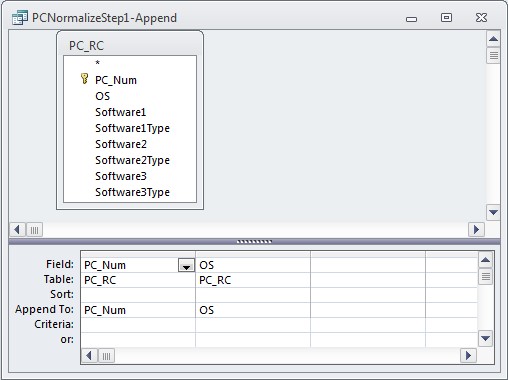
INSERT INTO PC ( PC_Num, OS )
SELECT PC_RC.PC_Num, PC_RC.OS
FROM PC_RC;


Or in the Query Builder:


The resulting table looks like this:


Since I already have an autonumber primary key defined on the table, I don't need to do anything further.

Step 2: Create Software_Temp table

This step is exactly the same as Step 2 above. I'll use a Make-Table query to create a temporary table that will be used for creating the relationships later.

INSERT INTO Software_Temp ( PC_ID, Software, SoftwareType )
SELECT PC_Software_Temp.PC_ID, PC_Software_Temp.Software, PC_Software_Temp.SoftwareType
FROM (SELECT PC.PC_ID, Software1 As Software, PC_RC.Software1Type as SoftwareType
FROM PC INNER JOIN PC_RC ON PC.PC_Num = PC_RC.PC_Num
WHERE Software1 IS NOT NULL
UNION
SELECT PC.PC_ID, PC_RC.Software2, Software2Type as SoftwareType
FROM PC INNER JOIN PC_RC ON PC.PC_Num = PC_RC.PC_Num
WHERE Software2 IS NOT NULL
UNION
SELECT PC.PC_ID, PC_RC.Software3, Software3Type as SoftwareType
FROM PC INNER JOIN PC_RC ON PC.PC_Num = PC_RC.PC_Num
WHERE Software3 IS NOT NULL) AS PC_Software_Temp;


The result will be a table that looks like this:


Step 3: Remove Duplicates from Software_Temp

I need to create a query that removes the duplicate values. The DISTINCT predicate works well for that. As before, I'll use an Append write the data to my existing Software table:

INSERT INTO Category ( SoftwareType )
SELECT DISTINCT Software_Temp.SoftwareType
FROM Software_Temp;


With the resulting table:


Again, this table already has an autonumber primary key, so I don't need to create one.

Step 4: Creating the Linking Table: PC_Software

So now, I've got my two "One-Side" tables: PC and Software. Now I just need to fill the linking table.
I can do that with an Append Query and a simple join of Software and Software_Temp:

INSERT INTO Software ( Software, CategoryID )
SELECT DISTINCT Software_Temp.Software, Category.CategoryID
FROM Software_Temp INNER JOIN Category ON Software_Temp.SoftwareType = Category.SoftwareType;


Or in the Query Builder:


The final result will look like this:


It is important to note that the order in which the data is moved is vital. Data must be written into the "one-side" tables (PC and Software) first, and then data can be moved into the "linking" tables (PC_Software).

This two-part post is available as a single download (with sample database) here: http://www.rogersaccesslibrary.com/forum/normalizingrepeatingcolumns1_topic562.html.