Showing posts with label ER Diagramming. Show all posts

Friday, June 23, 2017

Entity-Relationship Diagramming: Part IV

In Entity-Relationship Parts I, II, and III, I described a method of normalization that builds up from individual data elements. Following this method results in a database design that is normalized to the Third Normal Form -- without having to know what the Normal Forms are.

(I haven't discussed the Normal Forms. Perhaps I will in a later post.)

In Part III, I left off with the completed Entity-Relationship Diagram shown in Figure 1.

Figure 1: Employee Database E-R Diagram


When I do E-R diagramming, I like to ignore the attributes, concentrating instead on just the entities and their relationships. But at some point, obviously, the attributes have to come back into it. I like to save that to the end.

There are some good E-R diagramming tools available out there, like Visio and ERWin, but for small projects, I usually just implement the tables directly in Access and create the Relationships there. The Access Relationship Window works pretty well as a diagramming tool, and you've got a completed database at the end.

Implementing an E-R Diagram

So far, I've talked about Entities and Attributes. I do that deliberately to keep myself from thinking about implementation issues while I'm designing the data model. But at the implementation phase, entities become tables and attributes become fields.

The first thing I do is add an Autonumber, Primary Key field (Surrogate Key), to each table, naming it after the table with a suffix of "ID". Thus the tblEmployee table will have a field EmployeeID. Then I create a Unique Index on the Natural Key I identified during E-R diagramming process.

At this point, my tables look like Figure 2.

Figure 2: Tables with Surrogate Keys Added


Now it's time to look at my relationships. Relationships are created on fields holding related information, Primary Key to Foreign Key. In a One-to-Many (1:M) relationship, the primary key of the table on the "One" side is added to the table on the "Many" side table and becomes the foreign key.

Since there is a 1:M relationship between tblEmployee and tblEmployeeCertification, I'll put EmployeeID in EmployeeCertification and it will become the foreign key for tblEmployee.

I'll do the same with every relationship. The resultant tables look like Figure 3.

Figure 3: Tables with Foreign Keys Added


Lastly, I need to create the actual relationships. I do this by clicking and dragging the primary key of one table into its corresponding foreign key in the other. For instance, I'll click on EmployeeID in tblEmployee and drag it to EmployeeID in tblJobHistory.

When I do, I will get an "Edit Relationships" dialog box shown in Figure 4.

Figure 4: Edit Relationships Dialog Box


The Referential Integrity box will not be checked by default. However, you MUST check it in order to create a true relationship. Without it, Access will create a line between the tables, but it will NOT be a relationship.

When you click the Referential Integrity box, Access should correctly identify the relationship as a One-to-Many relationship. If it does not, if it says Indeterminate, you've done something wrong.

Clicking OK results in the relationship being created. Figure 5 shows that.

Figure 5: Relationship Between tblEmployee and tblJobHistory.

Now, I'll just do that for the rest of the relationships, and I'm done.

Figure 6: Completed Data Model

The process I've outlined here is really just the bare bones. If you're interested in seeing examples in more detail, you can find some in the Tutorials: Database Design section of my website.


.

Tuesday, June 13, 2017

Entity-Relationship Diagramming: Part III

In this Entity-Relationship series, I'm attempting to present an alternative to standard, decomposition-style normalization.

In Entity-Relationship Diagramming: Part I, I grouped all the objects in my business narrative into either Entities or Attributes. Entities are groups of Attributes and Attribute describe Entities.

In Entity-Relationship Diagramming Part II, I defined the relationships between my entities. Relationships store information about how your Entities interact. Figure 1 shows where I left off.

Figure 1: Relationships Between Entities.


Unfortunately, I'm not done yet, for two reasons: 1) as I said in What is Normalization: Part V, many-to-many relationships cannot be directly implemented in a relational database, and 2) I still have an unassigned attribute. So first I'll rationalize the many-to-many relationship and then take another look.

To rationalize a many-to-many relationship between two tables, you create a third table -- an "intersection" or "linking" table. Then you create one-to-many relationships between the linking table and each of the main tables, with the "many-side" of both relationships on the linking table.

As you can see above, Employee and Certifications have a many-to-many relationship, so I need to create a new entity (Employee/Certifications). Sometimes linking tables have logical names. Other times, they don't. In that case, I simply combine the names of the base tables.

Figure 2 shows how the rationalized relationship is diagramed.

Figure 2: Rationalized Employee-Certification Relationship

Now I can see where to put my unassigned Certification Date field. The Employee/Certification entity represents a certification for a particular employee and that can be given at only one time. Therefore the Certification Date field goes in this new entity. Figure 3 shows the completed Attribute Grid.

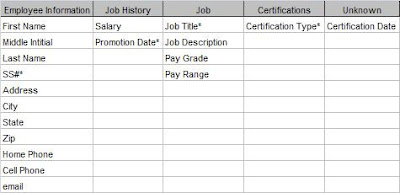
Figure 3: Final Attribute Grid


Now that I've got all the relationships between my entities identified and assigned all the attributes, I can put it all into one diagram.

Figure 4: Final E-R Diagram

Now I've got all the pieces. All that's left is to implement my diagram in Access (or some other database). In Entity-Relationship Diagramming: Part IV, I'll do just that.

.

Tuesday, June 6, 2017

Entity-Relationship Diagramming: Part II

In my last post, Entity-Relationships Part I, I approached the idea of normalization from a different point of view. Rather than breaking a large table into smaller, normalized tables, the Entity-Relationship process starts with the individual pieces and builds it up into a properly designed data model. It uses objects (Entities and their Attributes) and looks at the real-world Relationships that exist between them. The end result of this is an Entity-Relationship Diagram.

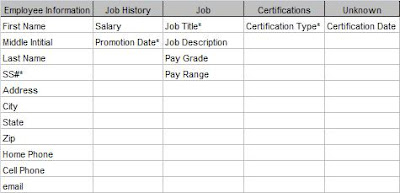
I started the process by writing a short narrative of the database requirements and grouping all the nouns into related categories. A few could not be assigned. Figure 1 shows the resultant grid.

Figure 1: Entity-Attribute Grid

At this point, I should say that this is not a strictly linear process . That is, you can't always move smoothly from one step to the next. Sometimes you have to move back and forth between them as you discover more things about your system.

That's what I'm going to do next. Because I have an unassigned attribute, I'm going to look at the relationships between my existing entities and see if something doesn't present itself.

To look at the relationships, I'm going to ignore the attributes for a while. Attributes do not have relationships, only entities do. If you discover that an attribute does have a relationship with some other entity or attribute, that's an indication that it is really an entity and your grid must change.

First, I'll determine the relationships between existing entities. In What Is Normalization, Part IV , I describe the different types of relationships: One-to-One (1:1), One-to-Many (1:M), and Many-to-Many (M:M). Then I'll diagram them in pairs.

The diagramming technique I'll use is one of the simplest. Entities are represented by boxes . Relationships between entities are represented by lines. "Crow's feet" show a "many-side" relationship and a vertical bar shows a "one-side" relationship. Figure 2 shows how the relationship types are represented.

Figure 2: Relationship Types

Many-to-Many: Common in real life, but cannot be represented in a database.
One-to-Many: The most common relationship in a database.

One-to-One: Seldom used.


So how do I know what the relationships are for my Employee Database? For that I need to go back to the narrative. The second paragraph describes "business rules", that is, how the business actually works. I'll repeat the paragraph here.

An employee can have multiple jobs over time, (ie, Analyst, Sr. Analyst, QA Administrator). Employees can also earn certifications necessary for their job.

From this I can write out the relationships in full sentences, and I find it useful to write them in both directions. For instance, from the narrative, I can say:

Employee-JobHistory
Each Employee can have One or More Job History instance
and
Each Job History instance can be for One and Only One Employee.

This is a classic One-to-Many relationship and we will diagram it as follows:

Job-Job History
Each Job can have One or More Job History instance
and
Each Job History instance can be for One and Only One Job.

Another One-to-Many relationship diagrammed as follows: Employee-Certifications
Each Employee can attain One or More Certifications
and
Each Certification can be earned by One or More Employees

This is a Many-to-Many relationship, and this will need additional work, but I'll leave it for now.
Job-Certifications
It might seem that there is no relationship between Job and Certifications, except for the word "necessary" in the narrative. In going back to the client, I discovered that certain certifications are necessary in order to be promoted to some jobs. Thus there IS a relationship as follows:

Each Job requires One or More Certification
but
Each Certification is for One and Only One Job

Another a One-To-Many relationship Each certification is only for a single job. It is important to verify this with the client. If a certification were required for many different jobs, the model would be different, but in this case it is for only one job. The certification requirements for Analyst I are different than for Analyst II.
These sentences are extremely useful when communicating with your client (or even if you're developing the database for yourself). If the client can say that each of the sentences is strictly true, then you'll know you've designed it correctly. If any of the sentences are wrong, you have to go back and re-evaluate your design.

Unfortunately, as I said in What Is Normalization, Part V , many-to-many relationships cannot be represented directly in a relational database. So I'm going to have to add some intersection (or "linking") tables.

I'll take care of that next in Entity-Relationship Diagramming: Part III

.

Wednesday, May 31, 2017

Entity-Relationship Diagramming: Part I

In the last series, Normalization Parts I, II, III, IV, and V, I approached normalization from a particular point of view. I put all the information into a single table then removed redundancies into separate tables. This method is called decomposition. Decomposition is fine for understanding the theory of normalization and for creating small databases. However, it is less useful for large databases. At least, I've found it so.

So I'm going to talk about another way to approach normalization that starts with the individual pieces and builds it up into properly normalized tables. This method is called the Entity-Relationship method and the final result is an Entity-Relationship Diagram. An E-R diagram is useful not just for creating the data model, but for documenting it as well.

Since we've been working with the Employee Database in our other examples, let's stick with it. But since I claimed that E-R method works for more complicated designs, let's make it a little more complex. I like to start with a short narrative of the requirements.

Narrative

ZYX Laboratories requires an employee tracking database. They want to track information about employees, the employee's job history, and their certifications. Employee information includes first name, middle initial, last name, social security number, address, city, state, zip, home phone, cell phone, email address. Job history would include job title, job description, pay grade, pay range, salary, and date of promotion. For certifications, they want certification type and date achieved.

An employee can have multiple jobs over time, (ie, Analyst, Sr. Analyst, QA Administrator). Employees can also earn certifications necessary for their job.

Next, I take the narrative and underline all of the nouns. (I'm going to bold them here because Blogger doesn't have underlining.)

Narrative 2

ZYX Laboratories requires an employee tracking database. They want to track information about employees, the employee's job history, and their certifications. Employee information includes first name, middle initial, last name, social security number, address, city, state, zip, home phone, cell phone, email address. Job history would include job title, job
description
, pay grade, pay range, salary, and date of promotion.
For certifications, they want certification type and date achieved.

An employee can have multiple jobs over time, (ie, Analyst, Sr. Analyst, QA Administrator). Employees can also earn certifications necessary for their job.

All of these nouns must be represented in the database -- some as Entities and some as Attributes. An Entity is a "thing" about which we store information. An Attribute is the information that is being stored.

So the next task is to group the nouns into logical groupings. At first pass, it appears that there are three entities: Employee Information, Job History, and Certification. It is useful at this point to put them in a grid and assign the rest of the attributes like Figure 1.

Figure 1: Attribute Grid

Next, I need to assign primary keys to each entity. (At this point, I call them "entities" rather than "tables".) As I said in What Is A Primary Key?, a primary key is a field or fields which uniquely identify a record. At this point, I'm dealing only with natural keys. Figure 2 shows the primary keys.


Figure 2: Attribute Grid with Primary Keys

Now we go back to our entities and look for two things:

  1. see if each attribute can have only one value for that entity, and
  2. see if each attribute truly belongs to the entity.

To determine the second, we look at "functional dependencies", which just means that each field's value depends on the value of the primary key.

So, for the Employee table, a person (as represented by the SS#) can have only one first name, last name, address, home phone, and so forth. That satisfies requirement #1. Secondly, if the value of the SS# changes, then so will all of those values. By that, I mean if we move to a different entity with a different SS#, that entity will have a different first name, last name, etc. (For our purposes here, we will assume that no two employees share any of these attributes.)

Now, what about the Job History table? Any time an entity has a compound primary key, you should look at it very closely to make sure all the fields depend on the entire primary key. Any particular job can have only one description, pay grade, and pay range. However, none of those depend on the Promotion Date.

I've got a problem here and I need to take another look. What I really have is information about two different "things".

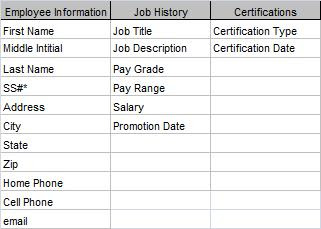
Job Title, Description, Pay Range and Pay Grade pertain to the Job as a category. Everyone who holds that position will have the same values. On the other hand, Salary and Promotion Date will be different for each person. So I really have two entities: 1) Job (information about the job itself), and 2) Job History (information about a particular employee's employment history.

I need take Job Title, Description, Pay Range and Pay Grade out of the Job History table and put them in the Job table.

Lastly, in the Certification table, Certification Date is also not fully dependant on the Certification Type. Different individuals achieve the certification at different dates. I don't have an entity to put the date in, so I'll put that to the side and come back to it later.

Figure 3 shows the amended grid.


Figure 3: Amended Attribute Grid

At this point, it is useful to look at the Relationships between these Entities. We may be able to find a place to put our unassigned attribute. But I'll save that for the next post: Entity-Relationship Diagramming: Part II.

.